Description
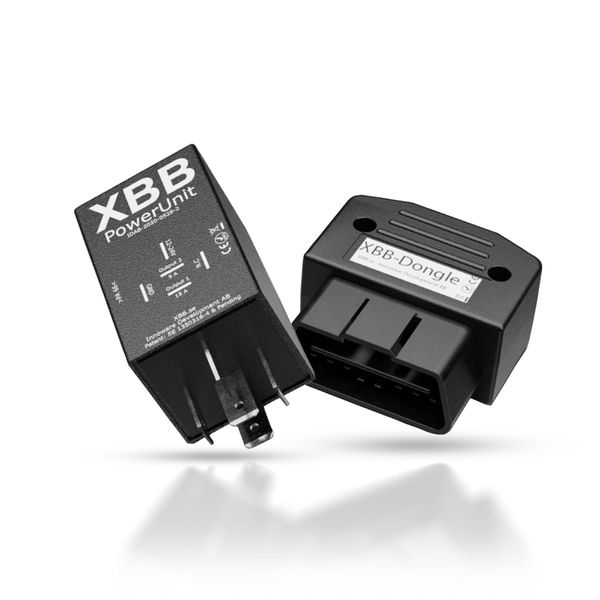
An innovative wiring device that allows you to wirelessly tap into the excitation current for the auxiliary light wiring harness directly from the car’s OBD-II port. The easiest way to connect auxiliary lights to your car.
The XBB OBD Dongle & PowerUnit is an innovative relay + driver combination that wirelessly senses the CAN bus. In many new cars with LED or Xenon technology on the headlamps, the control of the lights can be implemented via CAN bus, so that the excitation current for the conventional relay wiring harness cannot be tapped directly from the bulb’s power cord, as is the case with a halogen bulb. In this case, control of the auxiliary lights can be achieved by means of this control device, which can be inserted in the OBD-II port of the car, intercepts the signal of the long lights directly from the OBD port and passes it to the driver.wirelessly to a relay connected to the relay harness, which in turn controls the auxiliary lights according to this signal. The relay has two current outputs, which means that it can control not only the auxiliary light but also, for example, the parking light in the auxiliary lamp.
A DETAILED LIST OF COMPATIBLE CARS CAN BE FOUND HERE
The list may take a while to load, please wait patiently.
Note! The list of compatible cars includes only those models for which the manufacturer has had time to test the product. If your car model is not listed, you should try a “recipe” from another model of the same car make or another brand of the same group, as the XBB Dongle & PowerUnit is nevertheless compatible with almost all car makes and models.
So if you know that your car’s lights are CAN controlled, or the traditional relay wiring does not work, this is an excellent choice for connecting additional lights. The XBB OBD Dongle, which plugs into the car’s OBD port, receives the wake-up information directly from the car’s CAN bus and sends it wirelessly to the XBB PowerUnit relay that plugs into the standard relay harness (can be plugged into the harness in place of the standard relay). The XBB OBD Dongle and the XBB PowerUnit relay thus communicate wirelessly with each other, so there is no need to run any wires between the engine compartment and the car interior.
The XBB app downloaded to your phone allows you to select the make and model of car you are installing the additional lights on, then the information is sent from your phone to the XBB Dongle. The app is available on both Google Play and the App Store.
The relay can also be substituted for many off-the-shelf harness relays, such as the Purelux relay harness.
NOTE! If the OBD port is already occupied, or is needed for some other purpose, you can connect two devices to the port with this adapter: the OBD adapter
NOTE! The relay allows the direct installation of lights up to 180W only by replacing the relay wiring harness with a standard relay smart relay. It can also be used to install more powerful lights by making a small and easy additional installation (see instructions here: XBB Dongle installation for lights over 180W) or by buying the Purelux Dualrelay wiring harness (2 x DT or 2 x DTP connectors) sold as a set. These harnesses have a Plug&Play type ready-made slot for the XBB smart relay, so even more powerful lights can be installed without any extra fiddling.
Delivery contents
Powerunit only (Additional relay)
XBB PowerUnit
Dongle & Powerunit (Reader & Relay)
XBB Dongle
XBB PowerUnit
Dongle & Powerunit + 1 x DT Wiring harness (max 180W)
XBB Dongle
XBB PowerUnit
Relay wiring harness Purelux Pro Serie 12V, DT-2 (1 x DT output)
Dongle & Powerunit + 2 x DT wiring harness (max 2 x 180W)
XBB Dongle
XBB PowerUnit
Relay harness Purelux Dualrelay 12V, DT-2 (2 x DT outputs)
Dongle & Powerunit + 2 x DTP wiring harness (max 2 x 240W)
XBB Dongle
XBB PowerUnit
Relay wiring harness Purelux Dualrelay 12V, DTP (2 x DTP output)
Dongle & Powerunit + Smart Button (reader, relay and switch)
XBB Dongle
XBB PowerUnit
XBB Smart Button
This allows lights to be controlled wirelessly via Bluetooth!
Technical specifications
PowerUnit relay
Rated voltage: 12/24V
Operating voltage: 9-36V
Power consumption in sleep mode: 4 – 5.3 mA
Maximum load: 180W @ 12V
For lights over 180W, see installation guide here
Connection: 5 x 6.3 mm
Operating temperature: -40 – 85°C
Weight: 27g
Dimensions: 30 x 50 x 30 mm (L/W/S)
IP rating: IP53
EMC/Approvals:
EN 50498:2010
EN 50581:2012
RED 2014/53/EU
EN 300328 – V2.1.1
EN 301489-01 – V2.1.1
EN301489-17 – V3.1.1
EN 60950 – 1:2006
/11:2009
/A1:2010
/A12:2011
/A2:2013
EN 62479:2011-09
RoHS 2011/65/EU
Warranty: 12 months
XBB OBD Dongle
Rated voltage: 12/24V
Operating voltage: 9-36V
Power consumption in sleep mode: 3 – 5.4 mA
Power consumption in CAN communication: 30 mA
Connection: 2 x 8 pin male
Operating temperature: -40 – 85°C
Weight: 28 g
EMC/Approvals:
EN 50498:2010
EN 50581:2012
RED 2014/53/EU
EN 300328 – V2.1.1
EN 301489-01 – V2.1.1
EN301489-17 – V3.1.1
EN 60950 – 1:2006
/11:2009
/A1:2010
/A12:2011
/A2:2013
EN 62479:2011-09
RoHS 2011/65/EU
Warranty: 12 months
Quick guide
NOTE! The relay allows direct installation of lights with max 180W power. It is also possible to install more powerful lights with a small and easy additional installation. See here for instructions: installation of XBB Dongle for lights over 180W
Insert the XBB Dongle (driver device) into the vehicle’s OBD port. This will capture the signal of the long lights directly from the OBD port and send the information wirelessly to the relay (PowerUnit), which in turn will control the additional lights according to this signal. Download and open the XBB Conficurator app. Connect the app to the receiver, and enable the receiver (dongle) using the app. In the app, you can define, for example, where the output of relay 1 and 2 is triggered from, i.e. you can choose whether one controls the auxiliary light and the other the parking light, for example. See the manufacturer’s installation instructions below.
The relay can also be substituted for many off-the-shelf harness relays, e.g. the Purelux relay harnesses.
The manufacturer instructs that the relay should be installed vertically to prevent any water that may enter the engine room from entering the relay.
Wiring
For optimum response time, place the PowerUnit relay as close as possible to the XBB Dongle.
Locate the car battery or the power outlet in the engine compartment, and find a suitable place to connect the plus pole. If the battery is not in the engine compartment, but in the passenger compartment or boot, for example, there is usually a power outlet in the engine compartment that receives a constant voltage. Connect the cable either to the battery’s plus pole, or to an equivalent point on the power supply. Connect the other end of the wire to the 12-24V pin marked on the relay (a fuse should be inserted between the two).
Then connect the negative (GND) terminal of the relay either to the negative terminal of the battery (similar to the positive terminal, under a nut/bolt) or to a point on the car body where the harness can be grounded. We recommend connecting this to the chassis.
Once the wiring is complete, connect the auxiliary light power lead to the relay harness connector (Output 1) and the ground lead to the car body. Test the operation of the lights. If all is in order, bundle the extra wires in a neat bundle and secure the bundle in a suitable place in the engine compartment, protected from moisture.
WIRING CHART
RELAY POSITIONING
MANUFACTURER’S QUICK GUIDE (EN)
Be the first to review “Connection relay for extralights XBB – OBD Dongle & PowerUnit”