Description
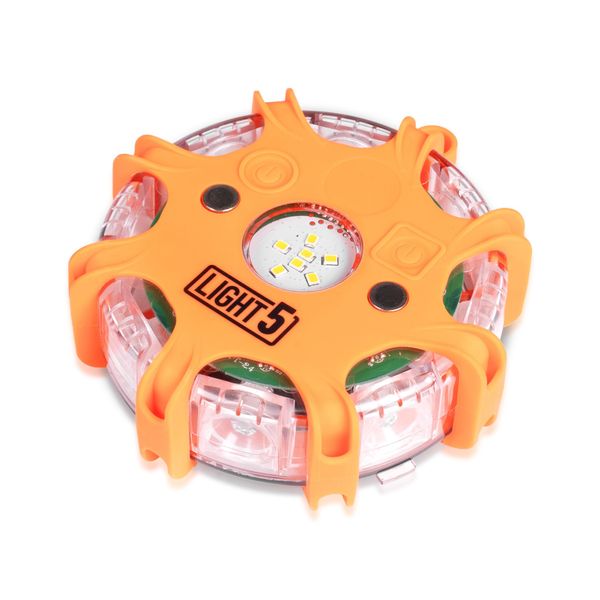
A handy spare puck for the Light5 Smart Flare Kit LED flare case! With the spare pucks, you can use more than the 6 LED pucks that come with the case. The smart flares are excellent helpers for authorities and construction sites, or as decorations for your home. Shock-, water- and dust-resistant construction!
Light5 Smart Flare is a smart LED light disc that is an extremely versatile tool for authorities and construction sites as well as for everyone’s own car. The light disc can be used, for example, for traffic control, signaling or as a traditional warning light for construction site vehicles or on walkways. It can also be used purely as a decorative light at home, for example, or it can be kept in the car as an emergency backup. The Smart Flare light discs are equipped with an eye-catching amber light and six different flashing functions, and their bright light attracts attention from a really long distance. A total of six light discs can also be synchronized to work with each other, so that the operating modes of all can be controlled via one disc – extremely convenient! The shock-, water- and dust-resistant light discs are a reliable helper regardless of the season and conditions, as they can withstand both frost and heat, and they do not stop flashing even when they are under a car. In addition, the light discs float in water, which means they can also be used for signaling on water.
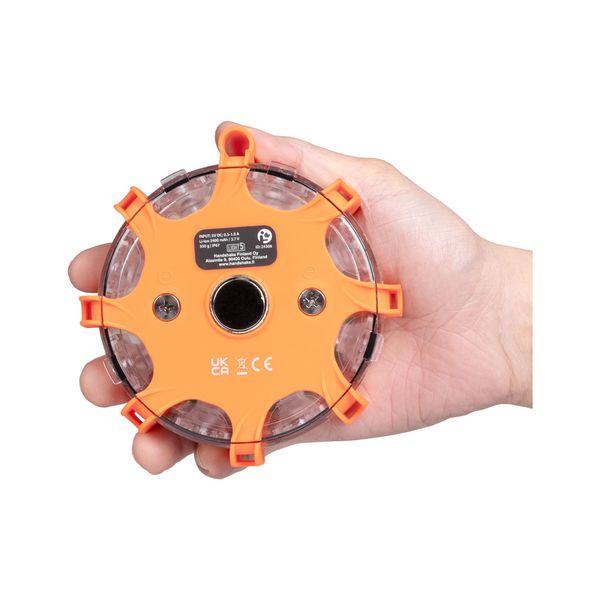
The Smart Flare light pucks are powered by a built-in 2400 mAh li-ion battery, which currently offers up to 80 hours of continuous operation at a time. The pucks can be charged wirelessly in the Smart Flare charging case.
Note! Smart Flare pucks can only be charged in the charging case intended for them, so to use the loose pucks, you also need the Light5 Smart Flare LED light puck set: Light5 Smart Flare Kit.
Specifications
Product: Light5 Smart Flare
Battery: Built-in 3.7V, 2400 mAh li-ion
Color of the light: Amber
Charging: Wireless charging in the Light5 Smart Flare case
Charging time: approx. 10-12 h
Operating modes: 6
Dimensions: 125 x 40 x 40 mm (Width x Height x Depth)
Weight: 347g
IP rating: IP67
Impact resistance: 5 m
Operating temperature: -20°C – +60°C
Storage temperature: -10°C – +45°C
Charging temperature: 0°C – +45°C
Warranty: 12 months
Operating modes and times (specified by the manufacturer)
Pulse: 15 hours
Single: 80 hours
Slow: 30 hours
Quick: 60 hours
Double Slow: 36 hours
Double quick: 38 hours
Quick guide
Activation: The pucks are automatically activated when they are removed from the charging case. When the pucks are removed from the case, they establish a wireless connection with each other and automatically take the next place in the series. If you want to turn off the pucks, place them back in the charging case. The pucks will automatically activate in the last operating mode used.
Manual operation: Individual pucks can be activated and deactivated manually by pressing and holding the round ON/OFF button on the puck. The LED indicator next to the button will flash 10 times to indicate deactivation. Press the ON/OFF switch once to reactivate the puck. The puck will automatically synchronize with the activated pucks.
Modes: Press the round button on any active puck to change the mode of all pucks. If you want to change the puck’s light source (whether the LEDs on top or on the side of the puck are lit), press the square button on any puck.
Charging: Charge the pucks by placing them in the charging case with the ON/OFF button facing away from the case. The chargers are stored in the charging case compartment, select the correct charger according to the power source. Lift the rubber cover of the DC port on the charging case and connect the charger cable plug to the port. Connect the charger to the power source. The LED indicator on the pucks will light up red to indicate charging and turn green when charging is complete.
Note: pucks cannot be charged anywhere other than in the charging case intended for them.
You can find the manufacturer’s user manual by clicking here.
Be the first to review “LED puck LIGHT5 Smart Flare”